






Internal Referrals
Online Dental Referral Management Software
With CareStack's Internal Referrals feature, you can refer patients seamlessly between providers and locations within your own practice account, without ever leaving the system. It's the easiest way to keep specialty care, second opinions, and complex cases inside your network, where you have full visibility and control.
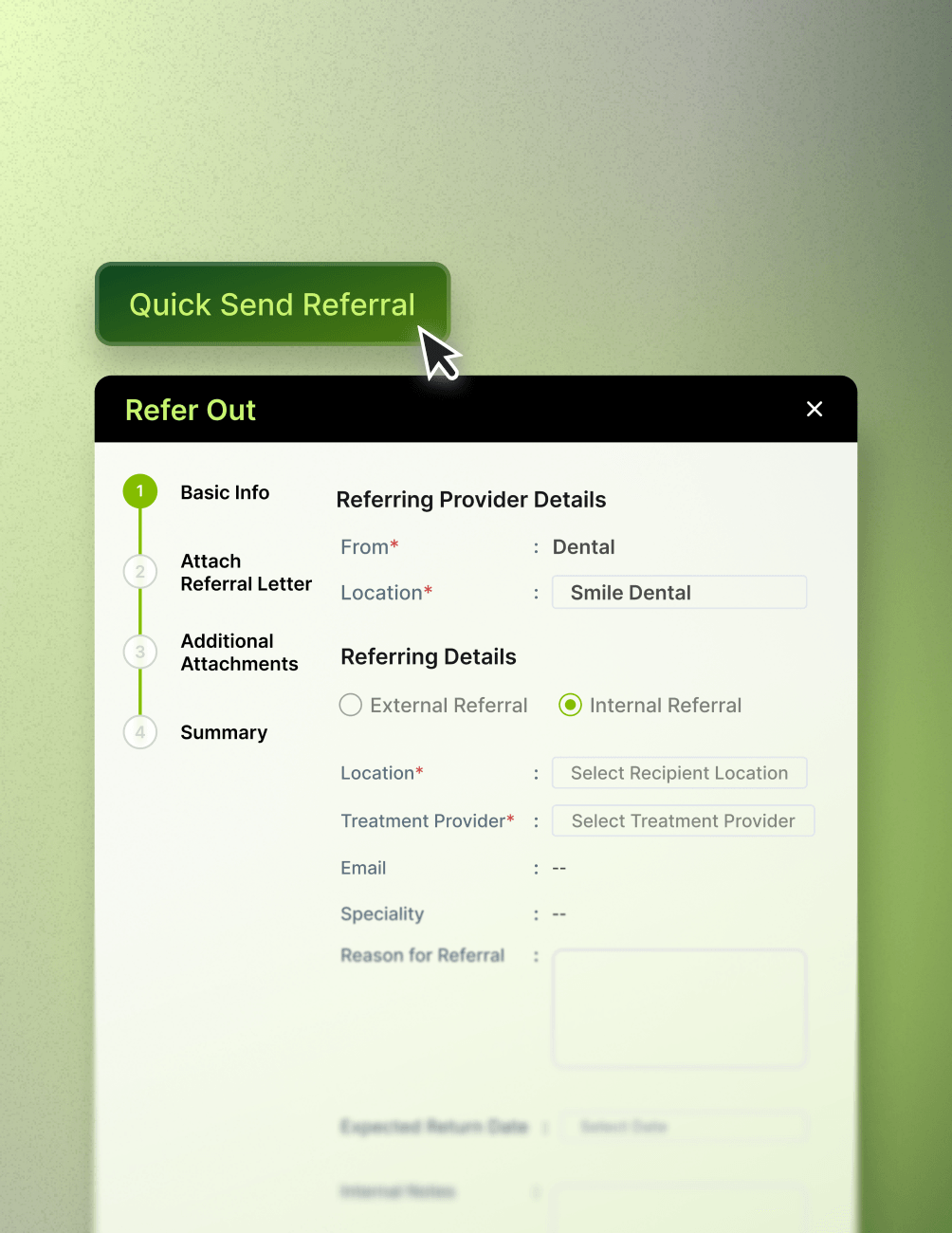
When a patient needs care from another provider in your group, simply send an internal referral directly to the recipient location and treatment provider. The referral, along with all relevant clinical details, attachments, and notes, flows instantly through CareStack's four-stage referral process. With Quick Send Referral, you can even fire off the referral in a single click to an in-house provider.
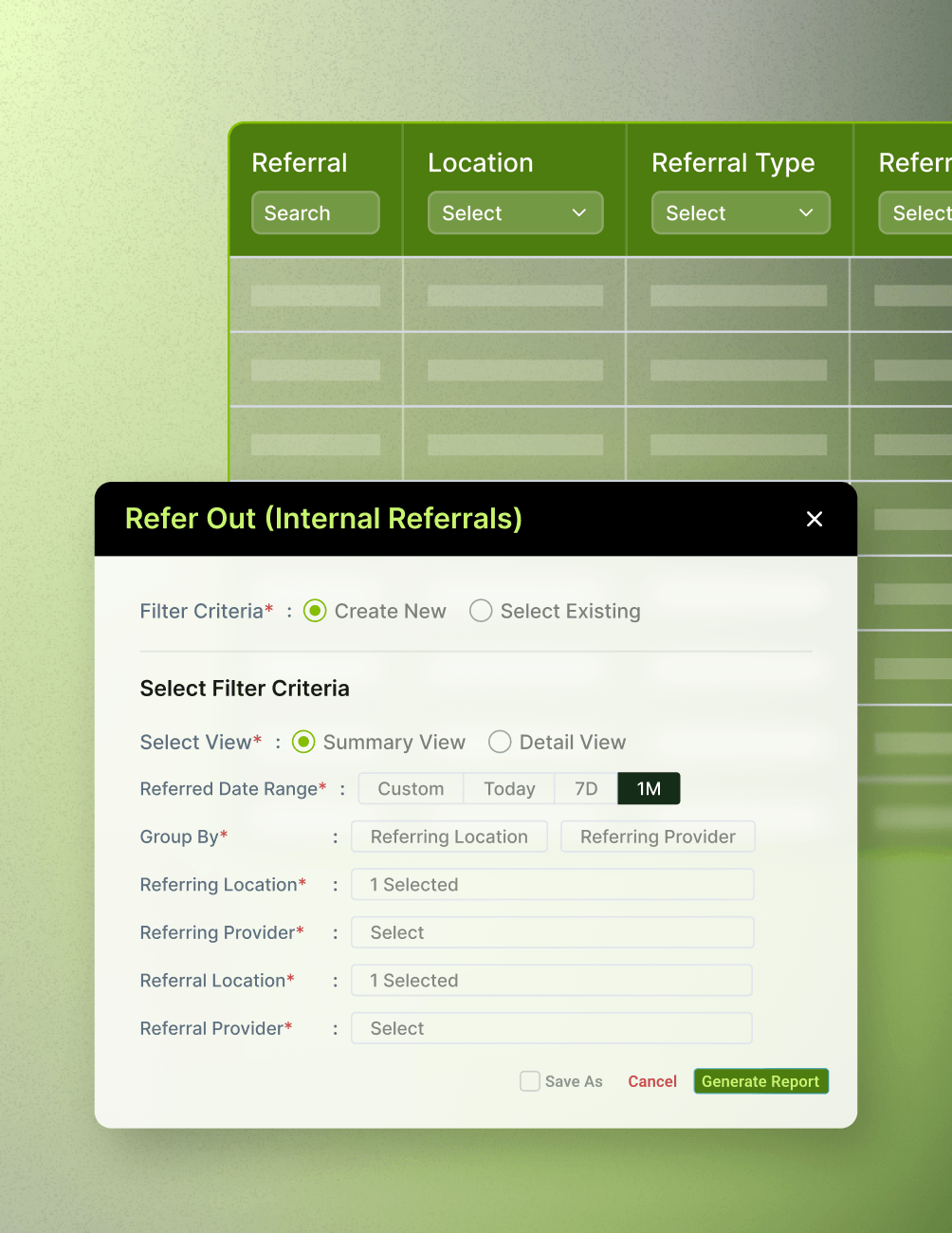
And with built-in reporting, practice owners and operations leaders can track every internal referral across the network, filtered by Provider, Location, and Date Range alongside the total dollar value of referrals made. That's complete visibility into how patients move through your group and how much revenue is being retained internally.
For the ultimate dental software, choose the solution that’s scalable for growing dental start-ups or large DSOs and still affordable for small mobile providers and single-office dental practices. Choose CareStack!

Key Benefits
Why Practices Love CareStack's Internal Referrals
Keep specialty and complex case referrals inside your practice network.
Refer instantly between providers and locations within the same account.
Track referral volume and dollar value across your entire group.
Use Quick Send Referral to dispatch referrals in a single click.
Improve internal communication and patient handoffs between providers.
Works seamlessly alongside CareStack's existing referral and clinical workflows.
Main Highlights
Internal Referrals for Modern Dental Practice Networks


Seamless Internal Referral Workflow
- In-Network ReferralsRefer patients directly to providers and locations within your own CareStack account.
- Quick SelectionSelect the Recipient Location and Treatment Provider with just a few clicks.
- Quick SendUse Quick Send Referral to instantly route the referral to an in-house provider.
- Tailored WorkflowInternal referral fields are tailored separately from external referrals for a faster workflow.
Complete Clinical Context
- Imaging IntegrationsAttach clinical images from integrated imaging partners (AEKA, SOTA, Tigerview, Apteryx).
- Complete Patient ContextInclude patient clinical information, medical history, insurance details, and documents.
- Save as DraftSave referrals as drafts and complete them later.
- Pre-Send ReviewReview the full referral summary, including insurance details, before sending.
Reporting & Visibility
- Detailed ReportsGenerate detailed reports on all internal referrals across your network.
- Flexible FiltersFilter referral reports by Provider, Location, and Date Range.
- Volume TrackingTrack the total number of referrals made within the account.
- Revenue TrackingTrack the total dollar value associated with internal referrals.
- Retained Revenue InsightGain visibility into how much patient revenue is retained inside the practice group.
Permissions & Configuration
- Granular PermissionsControl who can create, view, or edit referrals using profile-level permissions.
- Profile-Level ControlsEnable View Refer-Outs and Create/Edit Refer-Outs permissions per profile.
- Email TriggersConfigure referral email triggers and provider notifications.
- Auto-NotificationsNotify in-house providers automatically when an internal referral is created.
- Centralized SettingsManage all referral settings from a single, central location in CareStack.
FAQ
Why CareStack Is the Best Dental Practice Management Software
It's a CareStack feature that allows practices to refer patients to providers and locations within their own account, rather than to external providers. This keeps specialty care, second opinions, and complex cases inside your practice network with full clinical and financial visibility.
When you choose Internal Referral, the referral details section asks for the Recipient Location and Treatment Provider within your account, rather than an external provider's email and business name. You can also use Quick Send Referral to instantly send the referral to an in-house provider in a single step.
Yes. Internal referrals support the full range of attachments such as clinical images from integrated imaging partners (AEKA, SOTA, Tigerview, Apteryx), past treatments, medical history forms, patient overview, insurance details, allergies, conditions, and patient documents.
Yes. CareStack provides detailed referral reports that can be filtered by Provider, Location, and Date Range. You'll see the total number of referrals made along with the total dollar value associated with them, giving you a clear picture of internal referral volume and retained revenue.
Access is controlled by profile-level permissions. Administrators can enable View Refer-Outs and Create/Edit Refer-Outs permissions for each profile.
Yes, if email notifications are enabled in your Referral Settings. You can configure CareStack to automatically notify providers when a refer-out is created, ensuring the receiving provider is aware of the incoming patient.
support@carestack.com

Trusted by 3000+ Dental Practices
CareStack’s cloud dental software provides efficient practice management, world-class support, and modern tools and technology.






























RELATED FEATURES
Everything You Need. All in One Place.
Why the Smartest Dentists are Switching to CareStack
CareStack's software is cost-effective and efficient, helping organizations of all sizes streamline operations and reduce costs while also helping to provide outstanding care.
CEO, Plum Dental Group